For cafés, tea stalls, QSRs and cloud kitchens
QR menu and ordering for cafés, QSRs and cloud kitchens
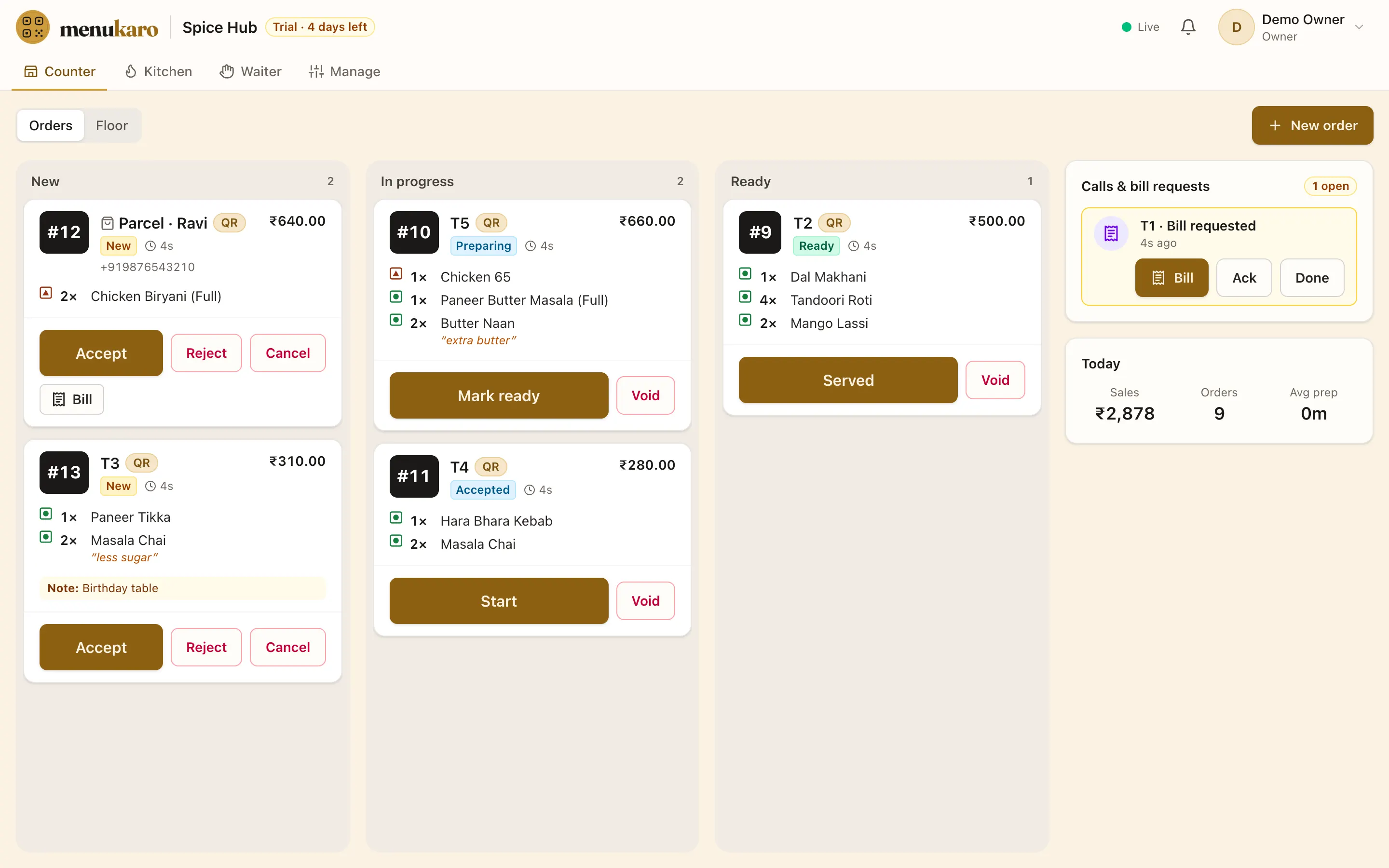
Small team, long queue? Guests order on their own phone while you make the coffee. The Counter screen does the rest — no kitchen screen or waiters needed.
Run it all from one phone
In counter mode, the person at the counter owns every step. Each order shows one big button for what to do next:
- 1 Accept the order — or let pay-first do it when the guest pays
- 2 Tap Ready: the guest's phone shows it with their token number
- 3 Tap Handed over when they collect
- 4 Settle the bill in cash; the GST bill is already worked out
New orders ring until someone accepts them, so a rush never leaves an order sitting unseen.
Parcel QR and token numbers
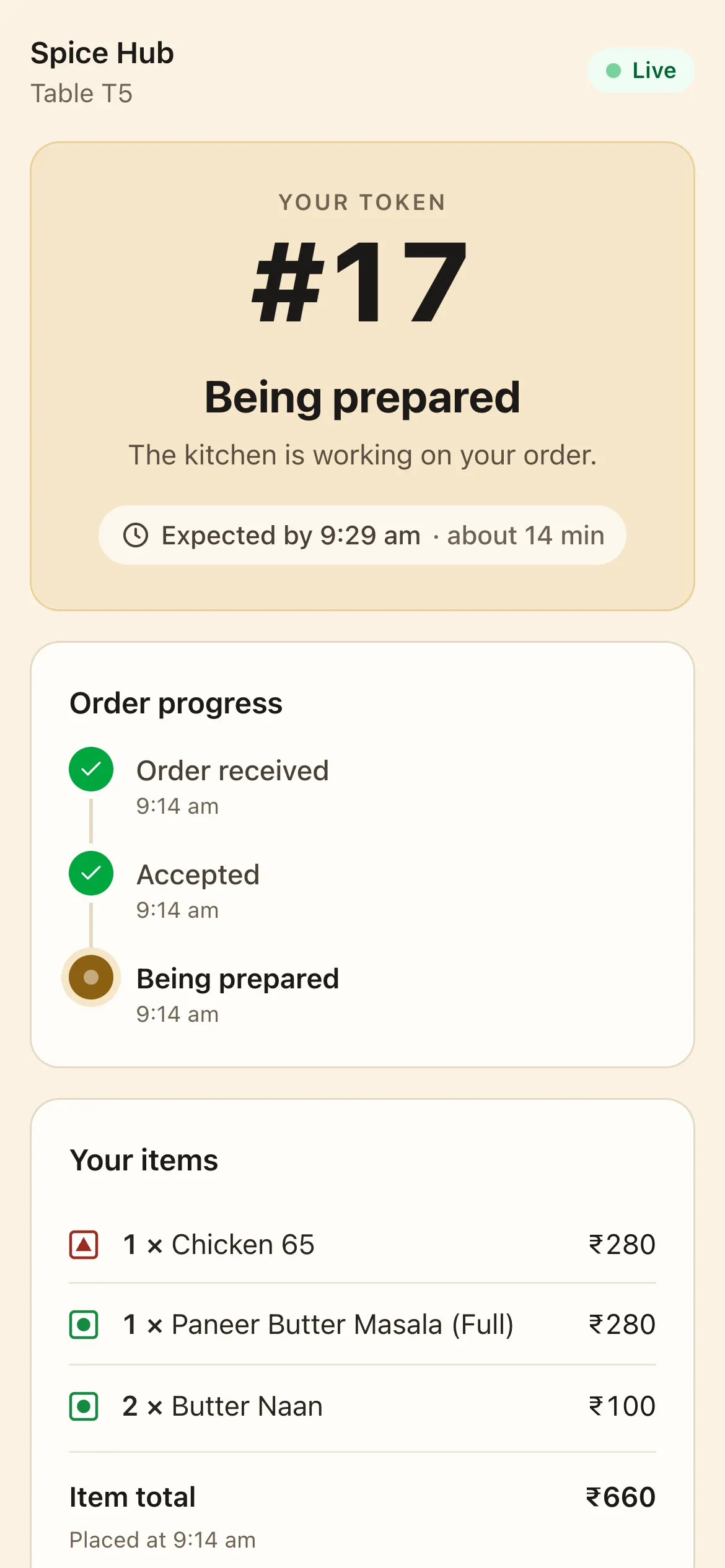
Put one parcel QR at the counter. Takeaway guests scan it, order, and give their name and mobile so you can reach them. They get a token number and watch the status live on their phone — no crowding at the counter asking “is mine ready?”.
- Name and mobile required for parcel by default (you can change it)
- Token number on the guest's phone and on your counter
- Status changes to Ready the moment you tap it
- Pay at pickup, or pay first at the counter
What to switch on for your kind of place
-
Café or tea stall
Counter only, on one phone or tablet
Guests order from the table or the counter QR; you run everything from one screen.
-
QSR or food court
Kitchen screen + pay first
Cash at the counter confirms the order and the bill in one step; the kitchen sees only paid orders.
-
Cloud kitchen
Parcel QR (+ kitchen screen)
For your own takeaway and pickup customers. Zomato and Swiggy orders don't come into Menu Karo yet.
-
Menu only
Digital Menu, no ordering
A QR menu with prices and photos from ₹299 / month — or free for up to 30 items.
Ordering starts at ₹999 / month + 18% GST on Starter (up to 10 tables, 1,500 orders a month included). Compare plans
Café and QSR owners ask
Can I run Menu Karo on just my phone?
Yes. The Counter works on any phone, tablet or laptop with a browser, and in counter mode it does every step — accept, ready, hand over and bill. Add a kitchen tablet later if you want one.
How do takeaway guests know their order is ready?
They scan the parcel QR, give their name and mobile, and get a token number. Their phone shows the order status and changes to Ready when you tap it, so you can call out the token. A TV token board is available on Growth and Pro.
What is pay-first mode?
For QSRs and food courts: a QR order waits as “awaiting payment” until the guest pays cash at the counter, and that payment accepts the order and creates the bill in one step.
Do I need a thermal printer?
No. Everything works on screens, and you can print a bill from the browser. Direct printing of KOTs, bills and tokens on thermal printers is available as an add-on.
Do Zomato and Swiggy orders come into Menu Karo?
Not yet. Menu Karo handles orders from your own QR codes and from your staff. Aggregator orders are on our list for later.
Start your 14-day free trial today
Set up your menu and tables, print the QR cards and take your first real order. No card needed. Prefer to talk first? Call us and we'll walk you through it.